Showing posts with label Autonomous Database. Show all posts

November 9, 2020

How to create Refreshable Clone on Autonomous Database

 One of the most widely used features in Autonomous Database on Shared Infrastructure (ADB-S) today is the ability to clone your database. This feature enables you to clone your source database easily and create another environment which can be used for development or testing purpose.

There are three types of cloning methods available in ADB such as


  • Full Clone – This creates a new database with the source database’s data & metadata.
  • Refreshable Clone – This creates a read only copy of the source database’s data and metadata.  This can be refreshed with source database’s data periodically as per requirement
  • Metadata Clone –    This creates a new database with only metadata of source database. 


Here in this topic I would be talking about Refreshable Clone on Autonomous Database. 


Refreshable Clone Features:-

A refreshable cloned instance is a read-only database, which basically stays connected with the source instance and when required it can pull data from the source instance just by simply clicking on “Refresh Clone” button. The entire cloning operating can take place without knowing much of cloning process nitty gritty.

The refreshable clone has a one week (7 days) refresh age limit. If once do not perform a refresh on the refreshable cloned instance, the cloned instance would no longer be refreshable further. However, the instance can be disconnected from source database and open the database as read write mode.


Step 1: Setting up an Autonomous Database

Login to OCI console.

Lets assume we already have an Autonomous Database created. Here in our demo we are using one Autonomous Transaction Processing database namely ATP-PROD


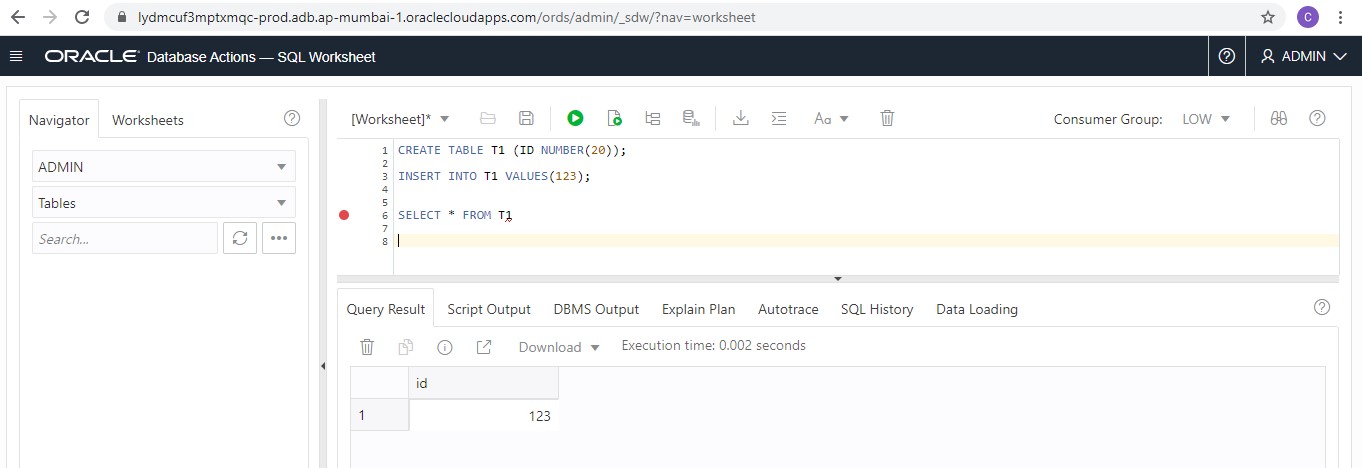
Navigate to Tools, and open SQL Developer Web. We can use SQL Developer which if its available on your local PC. Just make sure the connection towards the ATP-D is working properly. From SQL Developer we would firstly make some changes into the database.


Provide username: Admin and password to login into SQL Developer Web


Now that we have created a table, and inserted data into it. Lets start the cloning process


Step 2. Creating Refreshable Clone from Autonomous Database


Navigate to More Actions -> Click on “Create Clone” option.


Here Select the clone type as “Refreshable Clone” and for display name choose a name as per your convenience. In our case we chose Clone of ATP-PROD.


For Database name we choose a name UAT. Note:The cloned refreshable instance name cant be same as source database’s  name in same OCI region.


Choose the desired Network access type. In our case we choose “Allow secure access from everywhere”. If there is a VCN configured, this can be used as well for private access.

Choose a license type. We choose BYOL in our case.

Note:- For refreshable clone , there is no ADMIN password option available, as the password is inherited from the source database.


Step 3: Insert additional data into the source database

Now once refreshable clone instance is created open the 

SQL developer Web and lets check the data


So we can see the data has been cloned successfully into the refreshable cloned instance. Now let’s insert few more rows into source instance.


Step 4: Refresh the clone instance to view the data


Now here in the above screenshot it clearly shows the time by which cloned instance must be refreshed, else the instance won’t be able to refreshed further. 


While we hit the “Refresh Clone” button it asks for timestamp from where instance would get refreshed. In our case , we provided the timestamp after the time when we added a row into the table in source instance.


So after querying the table t1 from refreshable instance , we can see the data has been updated into the refreshable cloned instance.


So this concludes the testing of refreshable cloned feature in autonomous database.


Good To Know: -

  • Ø  Oracle ADB refreshable clone feature is not available in Always Free Autonomous database.

  • Ø  The Oracle ADB refreshable clone feature is available from Oracle Database 19c onwards in OCI.

  • Ø  To create a refreshable clone, the source database workload type must be either ATP (Autonomous Transaction Processing) or ADW (Autonomous Data Warehousing). Creation of refreshable clone from Autonomous JSON Database is not supported.

  • Ø  It is not possible to create a refreshable clone from another refreshable clone. But creation of  a full or Metadata clone is possible.

  • Ø  If its required to change the ADMIN password in refreshable clone, this must be done on source database followed by a refresh, which would eventually change the ADMIN password in the clone instance

  • Ø  Oracle Machine Learning is disabled in a refreshable clone read-only database. In addition, the OML User Administration URLs are disabled in the Oracle Cloud Infrastructure console and in the Autonomous Database Service Console.

  • Ø  Oracle APEX URL’s do not work in a refreshable clone, as the database runs in read/write mode. The APEX URL’s are disabled in OCI Console and Autonomous database Service Console. The URL are enabled when the database is open in read write mode when the cloned instance is disconnected from source database.

  • Ø  You cannot rename a refreshable cloned instance or database


Business cases where the Refreshable clone can be implemented: -

·            Ø  Providing a routinely updated clone to a different business unit within your organization for             reporting and analysis

  • Ø  Creating billing or workload separation for your databases between business units within the organization

  • Ø  Providing up-to-date read-only test database environments to internal teams

October 22, 2020

How to create Oracle Autonomous Database in OCI

What is autonomous database:-  An Oracle Autonomous Database is a cloud-based technology designed to automate many of the routine tasks required to manage Oracle databases which is mostly done by DBA's. It uses machine learning to automate database performance tuning, backups, securing database , patching etc.

Types of autonomous database based on workload :-


  •  Autonomous transaction processing
  •   Autonomous data warehouse
  •   Autonomous Json Database

To create Autonomous database, first login to Oracle cloud (www.oracle.com/cloud) 

October 19, 2020

Oracle Autonomous Database Schema Advisor

 Oracle Autonomous Database Schema Advisor

The ADB Schema Advisor is a light-weight utility that analyzes your on-premise or cloud Oracle Database schemas for the suitability of migration to the Oracle Autonomous Database. The Advisor discovers the schema objects and performs deep analysis to highlight the differences when the object gets created on Oracle Autonomous Data Warehouse or Oracle Autonomous Transaction Processing database, including the reasons when the object cannot be created.


The Advisor will run on pre-existing Schema and generates a report that highlights:

  •  The counts of discovered objects and a summary of migration status.
  •  Objects that cannot be migrated to the Autonomous Database due to the restrictions or lockdowns imposed on certain data types, Oracle Database options and SQL.
  • The Objects that will migrate with modifications automatically done during the import or the object creation process
  • Informational section containing certain best practice recommendations and guidance


Installation of Advisor:-

The autonomous database schema advisor can be installed from 11.2.0.4 onwards and it doesn’t require any additional license to use.

Download:-

We can download the advisor package from following  MOS Note 2462677.1

Installation Steps:

Initiate the ADB Advisor installation by invoking the following script as sys user.

sqlplus SYS AS SYSDBA @install_adb_advisor.sql <advisor schema name> <password>

If the advisor schema is not procreated , the above script will create it.

Once above script runs successfully, run the advisor to generate report.


SQL> conn adbadvisor

Enter password:

Connected.


Generate the Advisor report by executing ADB_ADVISOR package:

SQL>EXEC ADB_ADVISOR.REPORT(schemas=<List of schemas>'', adb_type=<adb_type>'');

Now here, list of schemas denotes the name of schemas on which you would like to run the analyse.

Enter “ALL” to analyse all user schemas.

Adb_type denotes different types destination such as

  •  'ATP' for Autonomous Transaction Processing (Serverless)
  •  'ADW' for Autonomous Data Warehouse (Serverless)
  •  'ATPD' for Autonomous Transaction Processing (Dedicated)
  •  'ADWD' for Autonomous Data Warehouse (Dedicated)


The report has 4 sections (see Sample Report for ATP):

  •  Section 1: Summary Section with object counts
  •  Section 2: List of objects that will not migrate to ADB
  •  Section 3: List of objects that will migrate with changes
  •  Section 4: Informational section and migration guidelines


Here we would migrate into ADW

SQL>EXEC ADB_ADVISOR.REPORT(schemas => ‘ALL', adb_type => 'ADW');

==========================================================================================

== ADW SCHEMA MIGRATION REPORT FOR APEXDEMO,SCOTT

==========================================================================================


ADB Advisor Version   : 19.4.0.0.0

Instance Name         : ora12c

Database Name         : ORA12C

Host Name             : server3.soumya.com

Database Version      : 12.1.0.2.0

Pluggable Database    : ora12c

Schemas Analyzed      : APEXDEMO,SCOTT

Analyzing for         : Autonomous Data Warehouse (Serverless)

Report Start date/time: 16-OCT-2020 11:09

------------------------------------------------------------------------------------------

-- SECTION 1: SUMMARY

------------------------------------------------------------------------------------------


                                           Objects         Objects         Total

                           Object          Will Not        Will Migrate    Objects

Object Type                Count           Migrate         With Changes    Will Migrate

-------------------------  --------------  --------------  --------------  --------------

CONSTRAINT                 111             0               0               111

INDEX                      41              0               0               41

PACKAGE                    3               0               0               3

PACKAGE BODY               3               0               0               3

SEQUENCE                   8               0               0               8

TABLE                      28              0               0               28

TRIGGER                    21              0               0               21

User Objects in SYS        120             120             0               0

User Objects in SYSTEM     0               0               0               0

-----------------------------------------------------------------------------------------

- SECTION 2: FOLLOWING OBJECTS WILL NOT MIGRATE

------------------------------------------------------------------------------------------


1) User-defined objects in SYS schema will not migrate (Count=120):

-------------------------------------------------------------------

Note: User-defined objects were detected in SYS schema. Consider moving them out of SYS prior to migration.


Owner      Object Type                    Object Name

---------- ------------------------------ ----------------------------------------

SYS        UNDEFINED                      CDB$ROOT

SYS        TABLE PARTITION                WRP$_REPORTS

SYS        INDEX PARTITION                WRP$_REPORTS_DETAILS_IDX02

SYS        INDEX PARTITION                WRP$_REPORTS_DETAILS_IDX01

SYS        INDEX PARTITION                SYS_IL0000006450C00009$$

SYS        TABLE PARTITION                WRP$_REPORTS_DETAILS

SYS        TABLE PARTITION                WRP$_REPORTS_TIME_BANDS

SYS        SEQUENCE                       WRM$_DEEP_PURGE_INTERVAL

SYS        TABLE PARTITION                WRH$_FILESTATXS

SYS        INDEX PARTITION                WRH$_FILESTATXS_PK

SYS        TABLE PARTITION                WRH$_SQLSTAT

SYS        INDEX PARTITION                WRH$_SQLSTAT_INDEX

SYS        INDEX PARTITION                WRH$_SQLSTAT_PK

SYS        TABLE PARTITION                WRH$_SYSTEM_EVENT

SYS        INDEX PARTITION                WRH$_SYSTEM_EVENT_PK

SYS        TABLE PARTITION                WRH$_WAITSTAT

SYS        INDEX PARTITION                WRH$_WAITSTAT_PK

SYS        TABLE PARTITION                WRH$_LATCH

SYS        INDEX PARTITION                WRH$_LATCH_PK

SYS        TABLE PARTITION                WRH$_LATCH_MISSES_SUMMARY

SYS        INDEX PARTITION                WRH$_LATCH_MISSES_SUMMARY_PK

SYS        TABLE PARTITION                WRH$_DB_CACHE_ADVICE

SYS        INDEX PARTITION                WRH$_DB_CACHE_ADVICE_PK

SYS        TABLE PARTITION                WRH$_ROWCACHE_SUMMARY

SYS        INDEX PARTITION                WRH$_ROWCACHE_SUMMARY_PK

SYS        TABLE PARTITION                WRH$_SGASTAT

SYS        INDEX PARTITION                WRH$_SGASTAT_U

SYS        TABLE PARTITION                WRH$_SYSSTAT

SYS        INDEX PARTITION                WRH$_SYSSTAT_PK

SYS        TABLE PARTITION                WRH$_PARAMETER

SYS        INDEX PARTITION                WRH$_PARAMETER_PK

SYS        TABLE PARTITION                WRH$_SEG_STAT

SYS        INDEX PARTITION                WRH$_SEG_STAT_PK

SYS        TABLE PARTITION                WRH$_SERVICE_STAT

SYS        INDEX PARTITION                WRH$_SERVICE_STAT_PK

SYS        TABLE PARTITION                WRH$_ACTIVE_SESSION_HISTORY

SYS        INDEX PARTITION                WRH$_ACTIVE_SESSION_HISTORY_PK

SYS        TABLE PARTITION                WRH$_TABLESPACE_STAT

SYS        INDEX PARTITION                WRH$_TABLESPACE_STAT_PK

SYS        TABLE PARTITION                WRH$_OSSTAT

SYS        INDEX PARTITION                WRH$_OSSTAT_PK

SYS        TABLE PARTITION                WRH$_SYS_TIME_MODEL

SYS        DIRECTORY                      XMLDIR

SYS        DIRECTORY                      ORACLE_OCM_CONFIG_DIR

SYS        DIRECTORY                      ORACLE_OCM_CONFIG_DIR2

SYS        INDEX PARTITION                WRP$_REPORTS_IDX01

SYS        INDEX PARTITION                WRP$_REPORTS_IDX02

SYS        INDEX PARTITION                WRP$_REPORTS_IDX01

SYS        INDEX PARTITION                WRP$_REPORTS_IDX02

SYS        TABLE PARTITION                WRP$_REPORTS

SYS        INDEX PARTITION                WRP$_REPORTS_DETAILS_IDX02

SYS        INDEX PARTITION                WRP$_REPORTS_DETAILS_IDX01

SYS        INDEX PARTITION                SYS_IL0000006450C00009$$

SYS        TABLE PARTITION                WRP$_REPORTS_DETAILS

SYS        TABLE PARTITION                WRP$_REPORTS_TIME_BANDS

SYS        INDEX PARTITION                WRH$_FILESTATXS_PK

SYS        INDEX PARTITION                WRH$_SQLSTAT_INDEX

SYS        INDEX PARTITION                WRH$_SQLSTAT_PK

SYS        INDEX PARTITION                WRH$_SYSTEM_EVENT_PK

SYS        INDEX PARTITION                WRH$_WAITSTAT_PK

SYS        INDEX PARTITION                WRH$_LATCH_PK

SYS        INDEX PARTITION                WRH$_LATCH_CHILDREN_PK

SYS        INDEX PARTITION                WRH$_LATCH_PARENT_PK

SYS        INDEX PARTITION                WRH$_LATCH_MISSES_SUMMARY_PK

SYS        INDEX PARTITION                WRH$_DB_CACHE_ADVICE_PK

SYS        INDEX PARTITION                WRH$_ROWCACHE_SUMMARY_PK

SYS        INDEX PARTITION                WRH$_SGASTAT_U

SYS        INDEX PARTITION                WRH$_SYSSTAT_PK

SYS        INDEX PARTITION                WRH$_PARAMETER_PK

SYS        INDEX PARTITION                WRH$_SEG_STAT_PK

SYS        INDEX PARTITION                WRH$_DLM_MISC_PK

SYS        INDEX PARTITION                WRH$_SERVICE_STAT_PK

SYS        INDEX PARTITION                WRH$_ACTIVE_SESSION_HISTORY_PK

SYS        INDEX PARTITION                WRH$_TABLESPACE_STAT_PK

SYS        INDEX PARTITION                WRH$_OSSTAT_PK

SYS        INDEX PARTITION                WRH$_SYS_TIME_MODEL_PK

SYS        INDEX PARTITION                WRH$_SERVICE_WAIT_CLASS_PK

SYS        INDEX PARTITION                WRH$_INST_CACHE_TRANSFER_PK

SYS        INDEX PARTITION                WRH$_EVENT_HISTOGRAM_PK

SYS        INDEX PARTITION                WRH$_INTERCONNECT_PINGS_PK

SYS        INDEX PARTITION                WRH$_MVPARAMETER_PK

SYS        INDEX PARTITION                WRH$_CELL_GLOB_SUMM_PK

SYS        INDEX PARTITION                WRH$_CELL_DISK_SUMM_PK

SYS        INDEX PARTITION                WRH$_CELL_GLOBAL_PK

SYS        INDEX PARTITION                WRH$_CELL_IOREASON_PK

SYS        INDEX PARTITION                WRH$_CELL_DB_PK

SYS        INDEX PARTITION                WRH$_CELL_OPEN_ALERTS_PK

SYS        INDEX PARTITION                WRH$_IM_SEG_STAT_PK

SYS        UNDEFINED                      NON$CDB

SYS        INDEX PARTITION                WRH$_SYS_TIME_MODEL_PK

SYS        TABLE PARTITION                WRH$_EVENT_HISTOGRAM

SYS        TABLE PARTITION                WRH$_LATCH_CHILDREN

SYS        INDEX PARTITION                WRH$_LATCH_CHILDREN_PK

SYS        INDEX PARTITION                WRH$_EVENT_HISTOGRAM_PK

SYS        TABLE PARTITION                WRH$_LATCH_PARENT

SYS        INDEX PARTITION                WRH$_LATCH_PARENT_PK

SYS        TABLE PARTITION                WRH$_MVPARAMETER

SYS        INDEX PARTITION                WRH$_MVPARAMETER_PK

SYS        TABLE PARTITION                WRH$_CELL_GLOBAL_SUMMARY

SYS        INDEX PARTITION                WRH$_CELL_GLOB_SUMM_PK

SYS        TABLE PARTITION                WRH$_CELL_DISK_SUMMARY

SYS        INDEX PARTITION                WRH$_CELL_DISK_SUMM_PK

SYS        TABLE PARTITION                WRH$_CELL_GLOBAL

SYS        INDEX PARTITION                WRH$_CELL_GLOBAL_PK

SYS        TABLE PARTITION                WRH$_CELL_IOREASON

SYS        INDEX PARTITION                WRH$_CELL_IOREASON_PK

SYS        TABLE PARTITION                WRH$_DLM_MISC

SYS        INDEX PARTITION                WRH$_DLM_MISC_PK

SYS        TABLE PARTITION                WRH$_CELL_DB

SYS        INDEX PARTITION                WRH$_CELL_DB_PK

SYS        TABLE PARTITION                WRH$_CELL_OPEN_ALERTS

SYS        INDEX PARTITION                WRH$_CELL_OPEN_ALERTS_PK

SYS        TABLE PARTITION                WRH$_IM_SEG_STAT

SYS        INDEX PARTITION                WRH$_IM_SEG_STAT_PK

SYS        TABLE PARTITION                WRH$_SERVICE_WAIT_CLASS

SYS        INDEX PARTITION                WRH$_SERVICE_WAIT_CLASS_PK

SYS        TABLE PARTITION                WRH$_INST_CACHE_TRANSFER

SYS        INDEX PARTITION                WRH$_INST_CACHE_TRANSFER_PK

SYS        TABLE PARTITION                WRH$_INTERCONNECT_PINGS

SYS        INDEX PARTITION                WRH$_INTERCONNECT_PINGS_PK

------------------------------------------------------------------------------------------

-- SECTION 3: FOLLOWING OBJECTS WILL MIGRATE WITH CHANGES

------------------------------------------------------------------------------------------


------------------------------------------------------------------------------------------

-- SECTION 4: MIGRATION ADDITIONAL INFO

------------------------------------------------------------------------------------------


1) Tables and Partitions will be Compressed to QUERY HIGH in ADW (Count=28):

----------------------------------------------------------------------------

Note: When migrating to ADW, if a table or partition DDL does not contain a COMPRESSION clause, it will

be created with a default compression of QUERY HIGH. To modify this behavior, either add a compression

clause of your choice (or even NOCOMPRESS) prior to the export or alter the compression clause after

the import.


Owner                Object Type          Object Name

-------------------- -------------------- ---------------------------------------

APEXDEMO             TABLE                APEX$_ACL

APEXDEMO             TABLE                APEX$_WS_FILES

APEXDEMO             TABLE                APEX$_WS_HISTORY

APEXDEMO             TABLE                APEX$_WS_LINKS

APEXDEMO             TABLE                APEX$_WS_NOTES

APEXDEMO             TABLE                APEX$_WS_ROWS

APEXDEMO             TABLE                APEX$_WS_TAGS

APEXDEMO             TABLE                APEX$_WS_WEBPG_SECTIONS

APEXDEMO             TABLE                APEX$_WS_WEBPG_SECTION_HISTORY

APEXDEMO             TABLE                DBASOUMYA

APEXDEMO             TABLE                DBASOUMYA_ERR$

APEXDEMO             TABLE                DEMO_CONSTRAINT_LOOKUP

APEXDEMO             TABLE                DEMO_CUSTOMERS

APEXDEMO             TABLE                DEMO_ORDERS

APEXDEMO             TABLE                DEMO_ORDER_ITEMS

APEXDEMO             TABLE                DEMO_PRODUCT_INFO

APEXDEMO             TABLE                DEMO_STATES

APEXDEMO             TABLE                DEMO_TAGS

APEXDEMO             TABLE                DEMO_TAGS_SUM

APEXDEMO             TABLE                DEMO_TAGS_TYPE_SUM

APEXDEMO             TABLE                DEPT

APEXDEMO             TABLE                EBA_DEMO_FILES

APEXDEMO             TABLE                EBA_DEMO_FILE_PROJECTS

APEXDEMO             TABLE                EMP

SCOTT                TABLE                BONUS

SCOTT                TABLE                DEPT

SCOTT                TABLE                EMP

SCOTT                TABLE                SALGRADE


2) User defined tablespaces are not allowed in ATP-S and ADW-S (Serverless) (Count=2):

--------------------------------------------------------------------------------------

Note: Creation of tablespaces is disallowed in ATP and ADW (Serverless). The tablespace clause gets ignored

and all objects get created in 'DATA' tablespace. The following is the list of schemas and the tablespaces

currently in use.


APEXDEMO             APEX_2300472439289881

SCOTT                USERS


3) Table columns are defined using BYTE length semantics in a single-byte (8-bit) Character Set (Count=176):

------------------------------------------------------------------------------------------------------------

Note: If you have columns defined using BYTE length semantics, data truncation may occur when migrating

a single byte Character Set to a multi byte Character Set, as in the Autonomous Database. Refer to "Character

Set Migration" section of Database Globalization Support Guide for more


details, and run the below SQL

to get the list of columns defined using BYTE length semantics.


[Use the following SQL to get the full list of columns ...]

[SELECT a.owner, a.object_type, a.object_name table_name, a.subobject_name column_name, b.short_desc, b.long_desc FROM adb_advisor_info_tmp a, db_advisor_codes_tmp b WHERE a.cd = b.cd AND a.cd = 304]


4) Schema Owner's user attributes will be modified in ADB (Count=2):

--------------------------------------------------------------------

Note: The following schema owner's DEFAULT TABLESPACE and/or DEFAULT PROFILE will be modified in ADB.


DEFAULT TABLESPACE for APEXDEMO will be modified from 'APEX_2300472439289881' to

DEFAULT TABLESPACE for SCOTT will be modified from 'USERS' to 'DATA'

5) Database Options currently in use but will not be available in the ADB (Count=1):

------------------------------------------------------------------------------------

Note: The following Database Options are detected as being used. ADB does not have these Options installed.

Please verify if the application/schema to be migrated depends on these options.


Tuning Pack


6) Database Parameters are detected as modified in the current database but can't be modified in the ADB (Count=4):

-------------------------------------------------------------------------------------------------------------------

Note: The following init parameters are modified in your database that you would not be able to modify

in ADB. Please refer to the Oracle Autonomous Database documentation on the parameters that you are

allowed to modify.


control_management_pack_access

log_archive_dest_3

log_archive_dest_state_3

memory_target


------------------------------------------------------------------------------------------

-- END OF REPORT

------------------------------------------------------------------------------------------

Report End Datetime   : 16-OCT-2020 11:09

Report Runtime        : +000000000 00:00:35.679623000


PL/SQL procedure successfully completed.


Review the above report and take necessary action against it if required.


Deinstallation of ADB advisor:-

SQL> DROP USER ADBADVISOR CASCADE;


Oracle Database 26ai Installation Using RPM on Oracle Linux 9 (OEL 9) – Step-by-Step Guide

  In this post I will describe the installation of Oracle Database 26ai 64-bit on Oracle Linux 9 (OL8) 64-bit. The installation requires a m...